from pathlib import Path
import pandas as pd
print("Working folder:", Path.cwd().name)
csv_path = "data/movie_ratings.csv"
print("Movie CSV found:", Path(csv_path).is_file())Working folder: stat303-reading-data
Movie CSV found: TrueBefore analyzing a dataset, first we need to load the data into Python. This chapter introduces a workflow you will reuse throughout STAT303:
Read → inspect → diagnose → export → verify.
By the end, you should be able to:
sep value.Download and extract the Reading Data practice kit. Place stat303-reading-data inside the chapters folder of the stat303-1 course folder you built in Assignment B. Open stat303-1 in VS Code and select the course environment as the notebook kernel; it should already contain pandas. The terminal opens in stat303-1, so move it into the kit with cd chapters and then cd stat303-reading-data before you render the activity.
You can start this chapter before your stat303-1 folder exists. For now, place stat303-reading-data inside the stat303-setup folder from Chapter 2, open stat303-setup in VS Code, and select its .venv as the notebook kernel; it already contains pandas. The terminal then opens in stat303-setup, so move it into the kit with cd stat303-reading-data. After Assignment B moves stat303-setup into stat303-1/chapters/, move stat303-reading-data out of stat303-setup so that it sits directly inside chapters, as shown below. The notebooks find their files relative to the kit folder, so they keep working after the move.
stat303-1/
├── .venv/
├── assignments/
└── chapters/
    └── stat303-reading-data/
        ├── reading_examples.ipynb
        ├── activity03.ipynb
        ├── README.md
        └── data/
            ├── movie_ratings.csv
            ├── movie_ratings_semicolon.txt
            ├── movies_preview.json
            ├── movies_preview.html
            ├── Top 10 Albums By Year.csv
            └── bestseller_books.txt
Use reading_examples.ipynb to run the worked examples and activity03.ipynb for your own activity report. Both notebooks read their datasets from the data/ folder. Keep the input files there; exports will be saved beside the notebooks under new filenames.
movie_ratings.csv is the dataset for the chapter’s worked examples and activity. movie_ratings_semicolon.txt contains the same records with semicolon delimiters, so you can practice diagnosing and correcting a delimiter problem. The JSON and HTML previews contain five selected records and three columns for the format comparison. The kit also includes the album and book files used in extended practice.
Run this first in the examples notebook:
from pathlib import Path
import pandas as pd

print("Working folder:", Path.cwd().name)
csv_path = "data/movie_ratings.csv"
print("Movie CSV found:", Path(csv_path).is_file())
Working folder: stat303-reading-data
Movie CSV found: TrueThe working folder should be stat303-reading-data, and the file check should be True. If it is not, correct the notebook’s working directory as described in Move to the Folder You Need in Chapter 2, then rerun the file check until it returns True before proceeding. Changing directories in the terminal does not change the notebook’s working directory.
Structured data follows a defined organization. In the movie table, one row is a movie record and each column is a variable, such as title, production budget, or IMDB rating. A CSV or spreadsheet can represent this table.
Unstructured data includes free-form text, images, and audio that are not already organized as a table of variables. A movie review is unstructured text; a table with a review’s author, date, and rating is structured. Semi-structured formats, such as JSON, can organize records using keys while allowing nested or varying fields.
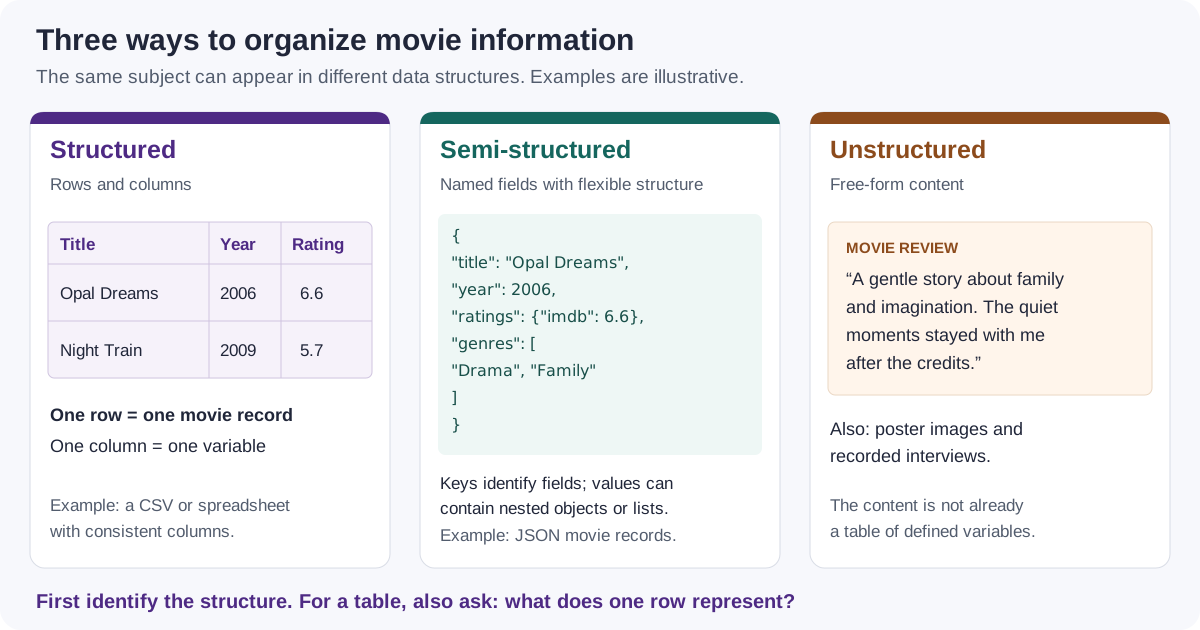
The format and the unit of observation are separate questions. A table of movie reviews might have one row per review, with many rows for the same movie. Always determine what a row represents before interpreting counts or summaries.
A CSV is a text file. In a typical comma-delimited file, the first record supplies column names and subsequent records supply values. Inspect a few lines before asking pandas to interpret them:
with open(csv_path, encoding="utf-8") as file:
    for _ in range(3):
        print(file.readline().rstrip())
Title,US Gross,Worldwide Gross,Production Budget,Release Date,MPAA Rating,Source,Major Genre,Creative Type,IMDB Rating,IMDB Votes
Opal Dreams,14443,14443,9000000,Nov 22 2006,PG/PG-13,Adapted screenplay,Drama,Fiction,6.5,468
Major Dundee,14873,14873,3800000,Apr 07 1965,PG/PG-13,Adapted screenplay,Western/Musical,Fiction,6.7,2588encoding="utf-8" tells Python how to read the text characters in this file. It may work without this argument if your environment already uses UTF-8. We specify it so the example reads the file consistently across computers.
Here, the header begins Title,US Gross,Worldwide Gross,.... The comma is the delimiter separating fields. The first movie record begins with Opal Dreams.
A field can contain a comma if it is quoted, as in "Movie, The",7.2. Quoting rules are one reason to use a CSV parser rather than splitting every line yourself. A .csv extension is a clue, not proof of the delimiter; some files use semicolons or tabs. Opening a file in a spreadsheet shows the parsed cells rather than the raw delimiters.
Pause and predict: Which values in the preview should become numbers? Which should remain text? Does the header represent a movie observation?
pandas is a Python library for organizing and analyzing tabular data with labeled rows and columns. The convention import pandas as pd lets us refer to its functions with the short name pd.
pd.read_csv() reads a file and returns a DataFrame, a two-dimensional table with row labels and column names. In this example, the default settings treat commas as delimiters and the first line as column names.
movies = pd.read_csv(csv_path)
movies.head()| Title | US Gross | Worldwide Gross | Production Budget | Release Date | MPAA Rating | Source | Major Genre | Creative Type | IMDB Rating | IMDB Votes | |
|---|---|---|---|---|---|---|---|---|---|---|---|
| 0 | Opal Dreams | 14443 | 14443 | 9000000 | Nov 22 2006 | PG/PG-13 | Adapted screenplay | Drama | Fiction | 6.5 | 468 |
| 1 | Major Dundee | 14873 | 14873 | 3800000 | Apr 07 1965 | PG/PG-13 | Adapted screenplay | Western/Musical | Fiction | 6.7 | 2588 |
| 2 | The Informers | 315000 | 315000 | 18000000 | Apr 24 2009 | R | Adapted screenplay | Horror/Thriller | Fiction | 5.2 | 7595 |
| 3 | Buffalo Soldiers | 353743 | 353743 | 15000000 | Jul 25 2003 | R | Adapted screenplay | Comedy | Fiction | 6.9 | 13510 |
| 4 | The Last Sin Eater | 388390 | 388390 | 2200000 | Feb 09 2007 | PG/PG-13 | Adapted screenplay | Drama | Fiction | 5.7 | 1012 |
head() shows the first five rows; it does not limit the number of rows imported. Calling head(3) would display three rows of the same DataFrame.
In the display, the bold labels at the left are the index. We did not request an index from the input data, so pandas supplied a RangeIndex starting at 0. Title is still a data column. The header is not counted as a movie record.
A DataFrame holds multiple columns, which may have different data types. Selecting a single named column with movies['IMDB Rating'] gives a Series: a one-dimensional sequence of values with row labels.
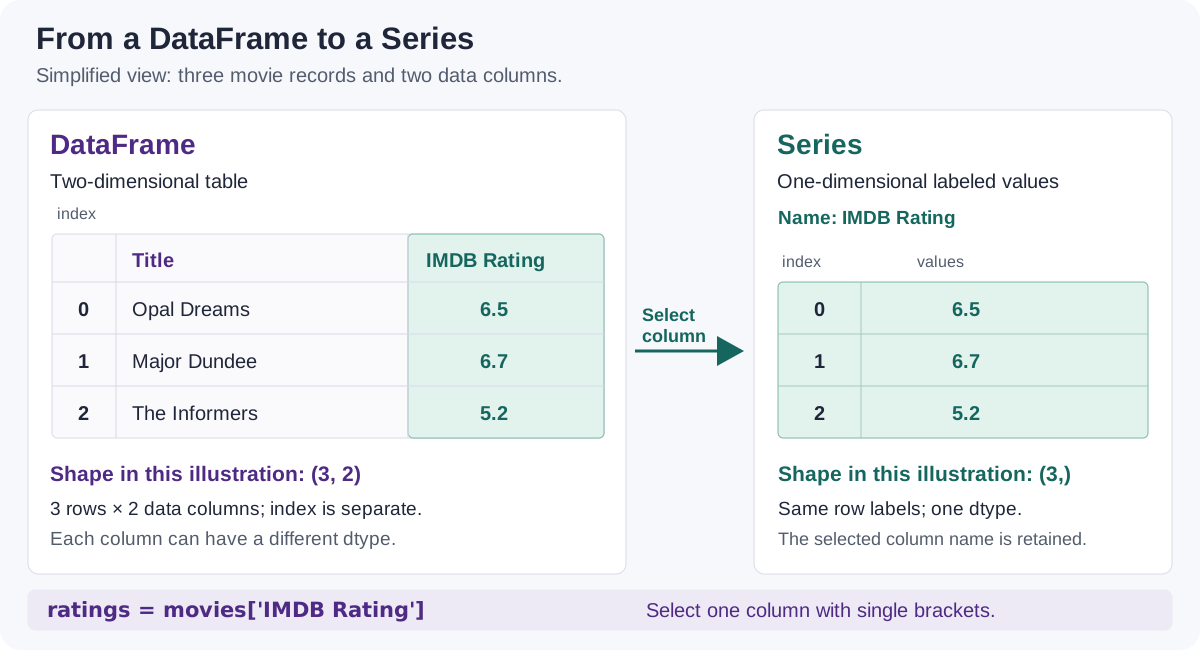
ratings = movies['IMDB Rating']
print("Table type:", type(movies))
print("Selected column type:", type(ratings))
print("Series shape:", ratings.shape)
ratings.head()
Table type: <class 'pandas.DataFrame'>
Selected column type: <class 'pandas.Series'>
Series shape: (2228,)0 6.5
1 6.7
2 5.2
3 6.9
4 5.7
Name: IMDB Rating, dtype: float64The Series keeps the corresponding row labels. Its shape is (2228,): one dimension with 2,228 values. The trailing comma marks a one-element Python tuple. A Series has one dtype; a DataFrame can have a different dtype for each column. We will study selection in more detail in the next chapter.
Do not stop at a plausible-looking preview. Check dimensions, column names, types, and summaries against what you expect from the source.
An attribute gives a property, such as movies.shape, without parentheses. A method performs an operation, such as movies.head(), and is called with parentheses. Methods can accept arguments: movies.head(3).
| Question | Tool | What to examine |
|---|---|---|
| How many rows and columns does the DataFrame have? | movies.shape |
Number of rows and data columns |
| Did the header parse correctly? | movies.columns |
Names, spelling, and unexpected columns |
| How are rows labeled? | movies.index |
Default row numbers or labels from data |
| Which types were inferred? | movies.dtypes |
Numeric, text, and other column types |
| Are values missing? | movies.info() |
Non-null counts compared with total rows |
| Are numeric values plausible? | movies.describe() |
Counts, center, spread, and extremes |
| What do individual records look like? | head(), tail(), sample() |
A few records from different parts of the data |
print("Shape:", movies.shape)
print("Column names:", movies.columns.tolist())
print("Index:", movies.index)
Shape: (2228, 11)
Column names: ['Title', 'US Gross', 'Worldwide Gross', 'Production Budget', 'Release Date', 'MPAA Rating', 'Source', 'Major Genre', 'Creative Type', 'IMDB Rating', 'IMDB Votes']
Index: RangeIndex(start=0, stop=2228, step=1)The shape (2228, 11) means 2,228 movie records and 11 data columns. The index is a separate row-label axis; it is not a twelfth column.
Compare the displayed names with the file header. A single column named Title;US Gross;Worldwide Gross;... would suggest a delimiter problem. An unexpected Unnamed: 0 column may come from a previously exported index, but inspect the source before deciding to remove it.
movies.dtypesTitle str
US Gross int64
Worldwide Gross int64
Production Budget int64
Release Date str
MPAA Rating str
Source str
Major Genre str
Creative Type str
IMDB Rating float64
IMDB Votes int64
dtype: objectLook for numeric types in columns such as IMDB Rating and Production Budget. Text may appear as str, string, or object, depending on the pandas version and how the data were read. object can also hold mixed kinds of values, so it is not a guarantee that every value is a string.
A date-looking value does not establish a datetime dtype. In this default CSV import, Release Date remains text. Later, you can request date parsing with parse_dates=['Release Date'] and verify the result. Similarly, a numeric-looking ID such as 00123 may need dtype={'ID': 'string'} to preserve leading zeros. The correct type depends on the meaning of the variable.
Type inference is convenient, but it cannot decide whether an identifier should be averaged or whether a recorded budget is accurate. Detailed conversions are covered in the next chapter, Pandas Fundamentals.
movies.info()<class 'pandas.DataFrame'>
RangeIndex: 2228 entries, 0 to 2227
Data columns (total 11 columns):
# Column Non-Null Count Dtype
--- ------ -------------- -----
0 Title 2228 non-null str
1 US Gross 2228 non-null int64
2 Worldwide Gross 2228 non-null int64
3 Production Budget 2228 non-null int64
4 Release Date 2228 non-null str
5 MPAA Rating 2228 non-null str
6 Source 2228 non-null str
7 Major Genre 2228 non-null str
8 Creative Type 2228 non-null str
9 IMDB Rating 2228 non-null float64
10 IMDB Votes 2228 non-null int64
dtypes: float64(1), int64(4), str(6)
memory usage: 191.6 KBinfo() prints a summary and returns None. Call it directly; print(movies.info()) adds an unnecessary None after the summary.
Compare each non-null count with 2,228, the total number of rows. In this file, IMDB Rating has 2,228 non-null values: pandas has not recognized missing ratings. If it had 2,220 non-null values, eight ratings would be missing.
movies.describe()| US Gross | Worldwide Gross | Production Budget | IMDB Rating | IMDB Votes | |
|---|---|---|---|---|---|
| count | 2.228000e+03 | 2.228000e+03 | 2.228000e+03 | 2228.000000 | 2228.000000 |
| mean | 5.076370e+07 | 1.019370e+08 | 3.816055e+07 | 6.239004 | 33585.154847 |
| std | 6.643081e+07 | 1.648589e+08 | 3.782604e+07 | 1.243285 | 47325.651561 |
| min | 0.000000e+00 | 8.840000e+02 | 2.180000e+02 | 1.400000 | 18.000000 |
| 25% | 9.646188e+06 | 1.320737e+07 | 1.200000e+07 | 5.500000 | 6659.250000 |
| 50% | 2.838649e+07 | 4.266892e+07 | 2.600000e+07 | 6.400000 | 18169.000000 |
| 75% | 6.453140e+07 | 1.200000e+08 | 5.300000e+07 | 7.100000 | 40092.750000 |
| max | 7.601676e+08 | 2.767891e+09 | 3.000000e+08 | 9.200000 | 519541.000000 |
For this mixed-type DataFrame, describe() summarizes its numeric columns. Read one column at a time:
| Row in the summary | Interpretation |
|---|---|
count |
Number of non-missing values in that column |
mean |
Arithmetic mean |
std |
Sample standard deviation |
min, max |
Smallest and largest values |
25%, 50%, 75% |
First quartile, median, and third quartile |
For IMDB Rating, the mean is about 6.24 and the median is 6.4, shown in the 50% row. These summaries describe the movie records in movie_ratings.csv; they do not establish a population-wide claim about movies.
Pause and explain: Why might describe() report a different count for two columns even though the DataFrame has a single row count?
movies.tail(3)| Title | US Gross | Worldwide Gross | Production Budget | Release Date | MPAA Rating | Source | Major Genre | Creative Type | IMDB Rating | IMDB Votes | |
|---|---|---|---|---|---|---|---|---|---|---|---|
| 2225 | Robin Hood | 105269730 | 310885538 | 210000000 | May 14 2010 | PG/PG-13 | Adapted screenplay | Action/Adventure | Fiction | 6.9 | 34501 |
| 2226 | Robin Hood: Prince of Thieves | 165493908 | 390500000 | 50000000 | Jun 14 1991 | PG/PG-13 | Adapted screenplay | Action/Adventure | Fiction | 6.7 | 54480 |
| 2227 | Spiceworld | 29342592 | 56042592 | 25000000 | Jan 23 1998 | PG/PG-13 | Adapted screenplay | Comedy | Fiction | 2.9 | 18010 |
movies.sample(n=3, random_state=303)| Title | US Gross | Worldwide Gross | Production Budget | Release Date | MPAA Rating | Source | Major Genre | Creative Type | IMDB Rating | IMDB Votes | |
|---|---|---|---|---|---|---|---|---|---|---|---|
| 1675 | In Good Company | 45489752 | 63489752 | 26000000 | Dec 29 2004 | PG/PG-13 | Original Screenplay | Comedy | Fiction | 6.8 | 25695 |
| 1824 | Underworld: Evolution | 62318875 | 111318875 | 45000000 | Jan 20 2006 | R | Original Screenplay | Action/Adventure | Fiction | 6.6 | 48551 |
| 1944 | Stargate | 71565669 | 196565669 | 55000000 | Oct 28 1994 | PG/PG-13 | Original Screenplay | Action/Adventure | Fiction | 6.7 | 47174 |
tail(3) shows the last three records. sample() selects rows randomly; random_state=303 makes the selection repeatable for a given implementation and input. These previews help detect problems that head() might miss, but no three-row preview proves the entire file is valid.
The kit’s movie_ratings_semicolon.txt contains the same table with semicolons between fields. A .txt file can still contain structured tabular data. Inspect its first two lines:
text_path = "data/movie_ratings_semicolon.txt"
with open(text_path, encoding="utf-8") as file:
    for _ in range(2):
        print(file.readline().rstrip())
Title;US Gross;Worldwide Gross;Production Budget;Release Date;MPAA Rating;Source;Major Genre;Creative Type;IMDB Rating;IMDB Votes
Opal Dreams;14443;14443;9000000;Nov 22 2006;PG/PG-13;Adapted screenplay;Drama;Fiction;6.5;468Predict before running: What could happen if pandas uses its default comma delimiter?
A wrong separator can produce either an incorrectly parsed DataFrame or a parsing error. The supplied diagnostic catches the expected parsing error so the rest of the notebook can run. You do not need to write your own exception-handling code for this chapter.
try:
    default_import = pd.read_csv(text_path)
    print("Default-import shape:", default_import.shape)
    print("Default-import columns:", default_import.columns.tolist())
except pd.errors.ParserError:
    print("The default comma delimiter could not parse this file consistently.")
The default comma delimiter could not parse this file consistently.With these records, commas inside some titles can cause inconsistent field counts when commas are incorrectly treated as delimiters. In other files, the same mistake may produce one large column without an exception. Success means obtaining a DataFrame with the intended rows, columns, and values, not merely avoiding an error.
Specify the actual delimiter and inspect the result:
movies_text = pd.read_csv(text_path, sep=';')
print("Corrected shape:", movies_text.shape)
print("Corrected columns:", movies_text.columns.tolist())
movies_text.head(3)
Corrected shape: (2228, 11)
Corrected columns: ['Title', 'US Gross', 'Worldwide Gross', 'Production Budget', 'Release Date', 'MPAA Rating', 'Source', 'Major Genre', 'Creative Type', 'IMDB Rating', 'IMDB Votes']| Title | US Gross | Worldwide Gross | Production Budget | Release Date | MPAA Rating | Source | Major Genre | Creative Type | IMDB Rating | IMDB Votes | |
|---|---|---|---|---|---|---|---|---|---|---|---|
| 0 | Opal Dreams | 14443 | 14443 | 9000000 | Nov 22 2006 | PG/PG-13 | Adapted screenplay | Drama | Fiction | 6.5 | 468 |
| 1 | Major Dundee | 14873 | 14873 | 3800000 | Apr 07 1965 | PG/PG-13 | Adapted screenplay | Western/Musical | Fiction | 6.7 | 2588 |
| 2 | The Informers | 315000 | 315000 | 18000000 | Apr 24 2009 | R | Adapted screenplay | Horror/Thriller | Fiction | 5.2 | 7595 |
The corrected import has the same dimensions and names as the original CSV. Use sep='\t' for tabs or sep='|' for pipes. The reader is still read_csv() even when the filename ends in .txt.
For initial exploration, pd.read_csv(text_path, sep=None, engine='python') can infer a delimiter from a sample. That inference can be wrong; inspect the result and use an explicit separator once you know the format.
| Symptom | First check |
|---|---|
FileNotFoundError |
Notebook working directory, extracted files, exact spelling and capitalization |
| One very wide column | Raw header and the sep argument |
ParserError |
Delimiter, quotation marks, and inconsistent records in the source |
| Numbers appear as text | Currency symbols, unexpected text, or special missing-value markers |
An extra Unnamed: ... column |
Empty header fields or an index saved by an earlier export |
UnicodeDecodeError |
Source encoding; specify its documented encoding rather than ignoring characters |
Fix the cause before proceeding. Skipping malformed records just to make an import succeed can silently change the dataset.
Writing data is another parsing decision: which values, column names, and row labels should the output contain? Use a new filename so the input remains available.
The index of movies is only generated row numbers. Save its 11 data columns with index=False:
export_path = "movies_export.csv"
movies.to_csv(export_path, index=False, encoding='utf-8')
print("Export created:", Path(export_path).is_file())
Export created: Trueto_csv() writes the index by default. To see why the choice matters, compare a second export:
indexed_export_path = "movies_with_index.csv"
movies.to_csv(indexed_export_path, index=True, encoding='utf-8')
with open(indexed_export_path, encoding="utf-8") as file:
    print(file.readline().rstrip())
with open(export_path, encoding="utf-8") as file:
    print(file.readline().rstrip())
,Title,US Gross,Worldwide Gross,Production Budget,Release Date,MPAA Rating,Source,Major Genre,Creative Type,IMDB Rating,IMDB Votes
Title,US Gross,Worldwide Gross,Production Budget,Release Date,MPAA Rating,Source,Major Genre,Creative Type,IMDB Rating,IMDB VotesThe first header begins with a comma: it has a field for the unnamed row index. If read back using the defaults, that field becomes an extra data column, usually called Unnamed: 0.
Do not automatically discard every index. Another DataFrame might use a meaningful student ID as its index. Exporting it with index=False would omit those IDs unless they had first been preserved as a data column. You can deliberately save such an index with index=True, index_label='student_id', or move it back into a column before exporting. We will practice set_index() and reset_index() in the pandas chapters. An index need not be unique, so it is not automatically a database primary key.
reloaded = pd.read_csv(export_path)
print("Original shape:", movies.shape)
print("Reloaded shape:", reloaded.shape)
print("Same column names and order:", reloaded.columns.tolist() == movies.columns.tolist())
reloaded.head(3)
Original shape: (2228, 11)
Reloaded shape: (2228, 11)
Same column names and order: True| Title | US Gross | Worldwide Gross | Production Budget | Release Date | MPAA Rating | Source | Major Genre | Creative Type | IMDB Rating | IMDB Votes | |
|---|---|---|---|---|---|---|---|---|---|---|---|
| 0 | Opal Dreams | 14443 | 14443 | 9000000 | Nov 22 2006 | PG/PG-13 | Adapted screenplay | Drama | Fiction | 6.5 | 468 |
| 1 | Major Dundee | 14873 | 14873 | 3800000 | Apr 07 1965 | PG/PG-13 | Adapted screenplay | Western/Musical | Fiction | 6.7 | 2588 |
| 2 | The Informers | 315000 | 315000 | 18000000 | Apr 24 2009 | R | Adapted screenplay | Horror/Thriller | Fiction | 5.2 | 7595 |
This checks dimensions, names, and a few values. It does not establish that every value or dtype survived unchanged. CSV stores text representations rather than pandas dtype metadata, so dates, identifiers, and missing values may need explicit reading options again.
| Need | Reading option | Writing option |
|---|---|---|
| A semicolon delimiter | sep=';' |
sep=';' |
| UTF-8 text | encoding='utf-8' |
encoding='utf-8' |
| A documented missing-value marker | na_values=['Missing'] |
na_rep='Missing' |
| Preserve a meaningful index | index_col='student_id' |
index=True, index_label='student_id' |
| Omit generated row numbers | Read normally | index=False |
Use options to match the source or intended output, rather than adding them all to every command. In particular, formatting floats to fewer decimal places can discard precision.
The same inspection habit applies to other formats. Reading JSON files is part of the preparation for Assignment C.
JSON represents values using objects, arrays, and named fields. The kit’s preview uses a list of records: each object has a Title, IMDB Rating, and Production Budget.
json_path = "data/movies_preview.json"
print(Path(json_path).read_text(encoding='utf-8')[:400])
[
{
"Title": "Opal Dreams",
"IMDB Rating": 6.5,
"Production Budget": 9000000
},
{
"Title": "Major Dundee",
"IMDB Rating": 6.7,
"Production Budget": 3800000
},
{
"Title": "The Informers",
"IMDB Rating": 5.2,
"Production Budget": 18000000
},
{
"Title": "Buffalo Soldiers",
"IMDB Rating": 6.9,
"Production Budget": 15000000
},
{
"Titmovies_json = pd.read_json(json_path, orient='records')
print("JSON preview shape:", movies_json.shape)
movies_json.head()JSON preview shape: (5, 3)| Title | IMDB Rating | Production Budget | |
|---|---|---|---|
| 0 | Opal Dreams | 6.5 | 9000000 |
| 1 | Major Dundee | 6.7 | 3800000 |
| 2 | The Informers | 5.2 | 18000000 |
| 3 | Buffalo Soldiers | 6.9 | 15000000 |
| 4 | The Last Sin Eater | 5.7 | 2200000 |
The result has five rows and three columns because this is a deliberately small preview, not a full copy of the movie CSV. orient='records' specifies how this JSON represents the table. Arbitrary nested JSON is not necessarily ready for read_json(); it may need to be unpacked first.
The kit includes data/movies_preview.html, a local HTML page with a captioned table. Open it in a browser first. To parse it, an HTML parser such as lxml must be installed in your project environment. To run the HTML example, use %pip install lxml in a temporary notebook cell, restart the kernel if needed, and remove the installation cell afterward.
Then run the following in a new cell:
preview_tables = pd.read_html(
    'data/movies_preview.html',
    match='Title',
)
print('Tables found:', len(preview_tables))
preview_table = preview_tables[0]
print(preview_table.shape)
preview_table.head()
read_html() returns a list of DataFrames. The list’s length is the number of matching tables; the selected DataFrame’s shape gives its dimensions. match selects tables containing matching text. Inspect names and contents before deciding which table you need.
A URL can point directly to CSV or JSON, to an HTML page, or to an API endpoint. The content determines the reader; a URL is a location, not a data format. Live results can change and requests can fail, which is why the core lesson uses local files.
A separate web-data lesson can build on this sequence:
For HTML, read_html(..., attrs={'id': 'table-id'}) selects a table by its HTML attributes; attrs does not send HTTP request headers. HTTP headers belong in the fetch operation or supported URL storage options. A 403 response means access was refused; changing a User-Agent is not a guaranteed remedy. Network debugging is separate from checking the structure of a parsed table.
Goal: Read a local dataset, check whether it was imported correctly, and verify an exported CSV.
File: activity03.ipynb.
Submit: activity03.html through the final upload question in the Reading Data Canvas quiz.
These are the complete Activity 3 instructions. Use this section for the task list; the notebook contains spaces to record your work.
Open activity03.ipynb from the folder prepared in Set Up the Chapter Files, using the same project environment.
Your Name in the opening Raw cell’s author field. Keep the report settings.True before you continue.data/movie_ratings.csv into movies with pd.read_csv() using the default index. Display head(), shape, and columns.shape; explain whether the displayed row index is counted as a data column.movies.dtypes, run movies.info(), and display movies.describe().IMDB Rating has missing values according to its non-null count and the total row count. Use the output as evidence; a non-null value is not necessarily a valid value.describe() and identify the row that gives the median. Explain why head() alone cannot establish the size or completeness of the dataset.movies['IMDB Rating'] to ratings. Display type(ratings) and ratings.shape, then explain how this object differs from movies.movie_ratings_semicolon.txt. Identify the delimiter from the header and first record.movies_text using an explicit sep value. Display head(), shape, and columns; compare the dimensions and column names with movies.movies to movies_export.csv beside the notebook with index=False. Keep the supplied input files unchanged.reloaded; display its shape, columns, and head() and compare the dimensions and column names with the original. These checks verify structure, not every value or data type.index=False fits this DataFrame’s default row numbers and predict what extra column could appear when reading an export made with the default index=True.Restart the kernel, run all cells in order, resolve unexpected errors, and save. Add a brief Markdown completion note, then save again. The deliberately caught diagnostic in C may report a parser error; the corrected import must work.
In the terminal, from stat303-reading-data, run:
quarto render activity03.ipynb --to htmlFollow the Chapter 1 Quarto refresher: inspect the HTML and a copy opened outside the project folder. Confirm your name, code, current outputs, and explanations for A–D appear. Upload only activity03.html to the Reading Data Canvas quiz. Keep your notebook and CSV files locally.
HTML grading (16 points): import and dataset interpretation (3), inspection and Series explanation (5), delimiter diagnosis and correction (4), export and verification (3), and readable HTML with name and completion note (1).
These exercises use the kit’s local files and are additional practice, not part of the in-class quiz. Work in a separate notebook beside data/ and include code, outputs, and short explanations.
Read data/Top 10 Albums By Year.csv. Treat each row as an album entry for a year; do not assume titles are globally unique.
25%, 50%, and 75% values for Tracks. Using those quartiles, give a defensible approximate range for the proportion of album entries with 15 or fewer tracks; explain how ties at 15 limit precision.Minutes and Tracks columns to calculate the track-weighted mean duration in minutes: total album minutes divided by total tracks, across the listed album entries. For a Series, .sum() totals the values. Explain why this differs from giving every album equal weight regardless of its track count. The file’s Minutes values are rounded, so your result is approximate.Read the first two raw lines of data/bestseller_books.txt in Python before choosing a separator.
sep.Unnamed: .... Explain how repeated index exports could produce them. Preserve the source file and distinguish those columns from the book variables when reporting the DataFrame’s structure.index=False does not remove unwanted columns that are already in the DataFrame.Read the local JSON preview and the HTML preview. Compare their row counts and column names. Explain why the HTML reader returns a list while the JSON example returns a DataFrame.
You should now be able to explain why a file that loads without an error can still have been read incorrectly. Keep checking what one row means, how fields were separated, whether types and counts are plausible, and what information survives an export.
Next, Pandas Fundamentals develops selecting and filtering records, sorting, and creating variables. Pandas Intermediate then builds on those skills with transformations, label alignment, and custom logic. After the pandas chapters, NumPy Fundamentals introduces arrays, positions, and shape rules.
For reference: pandas CSV reader, DataFrame inspection, descriptive summaries, CSV writer, JSON reader, and HTML reader.