from pathlib import Path

import pandas as pd
import matplotlib.pyplot as plt
import seaborn as sns

import geopandas as gpd
import folium

DATA = Path("Datasets")
sns.set_theme(style="whitegrid", palette="colorblind", context="notebook")Appendix D — Geospatial Plotting for Final Projects
In Data Visualization II, you built figures out of panels and decided what each panel was for. This appendix answers a different question: what to do when the thing a panel should show is where. Maps answer questions about location, proximity, and geographic pattern, and they bring one requirement no other plot has — every layer has to agree about what its coordinates mean before it can be drawn on top of another.
Nothing here is required for any assignment. It is kept as a resource for final projects that involve locations, and it is written so you can read it end to end without running anything: every map below is saved with the page, including the interactive one.
By the end of this appendix you should be able to:
- Tell a shapefile from a GeoJSON file and read either one with
gpd.read_file(). - Read a layer’s coordinate reference system, and say why
set_crs()andto_crs()are not interchangeable. - Build a point layer from longitude and latitude columns and align it with a boundary layer before overlaying.
- Draw a static boundary map and a point map that answer a stated question.
- Shade regions by a statistic with a choropleth, and choose deliberately between a count, a rate, and a density.
- Produce an interactive map with
GeoDataFrame.explore()and Folium, add a second layer, and export it as HTML. - Say what a map does not establish, and keep a static fallback beside the interactive version.
This appendix has no practice kit, no activity, and no Canvas quiz. It is reference material for a project that involves locations.
D.1 Files and Packages
This appendix ships no practice kit. Its three data files live in the coursebook’s Datasets/ folder, beside the notebook: the 2013 Divvy trip sample divvy_2013.csv, the community population layer chicago_commpop.geojson, and the community boundaries in Datasets/chicago_boundaries/. The population file is a frozen copy of the GeoDa dataset used in the original chapter; its source and retrieval details are in the data source note. Geographic data has no equivalent of seaborn’s built-in datasets, so unlike the visualization chapters there is nothing to load in one line.
Run the notebook with Datasets/ beside it, using the project environment from the setup chapters.
A shapefile is a collection: .shp stores geometry, .shx indexes it, and .dbf stores attributes; the accompanying .prj describes the CRS. Keep companion files together. GeoJSON provides geometry and attributes in one file. Both can be read with gpd.read_file().
Environment check: this appendix needs three packages beyond the ones the visualization chapters used. In your activated project environment:
python -m pip install geopandas folium mapclassifygeopandas pulls in a sizable dependency chain (shapely, pyproj, pyogrio), so the install takes noticeably longer than pip install seaborn did. If it fails, or if you only want to read the material, every figure below is stored in the page and needs nothing installed.
D.2 Read Boundaries and Inspect Their CRS
Start with the boundary layer, and look at its coordinate reference system before anything else. gpd.read_file() reads a shapefile from its .shp path and finds the companion files itself.
import geopandas as gpd
import folium

boundary_path = DATA / "chicago_boundaries" / "geo_export_26bce2f2-c163-42a9-9329-9ca6e082c5e9.shp"
chicago = gpd.read_file(boundary_path)
print("CRS:", chicago.crs)
print("Bounds:", chicago.total_bounds)
chicago[["community", "geometry"]].head()
CRS: EPSG:4326
Bounds: [-87.94011408 41.64454312 -87.5241371 42.02303859]| community | geometry | |
|---|---|---|
| 0 | DOUGLAS | POLYGON ((-87.60914 41.84469, -87.60915 41.844... |
| 1 | OAKLAND | POLYGON ((-87.59215 41.81693, -87.59231 41.816... |
| 2 | FULLER PARK | POLYGON ((-87.6288 41.80189, -87.62879 41.8017... |
| 3 | GRAND BOULEVARD | POLYGON ((-87.60671 41.81681, -87.6067 41.8165... |
| 4 | KENWOOD | POLYGON ((-87.59215 41.81693, -87.59215 41.816... |
A coordinate reference system (CRS) describes how coordinates locate places. Longitude and latitude are angular coordinates; projected coordinates may be measured in metres or feet.
set_crs(...)assigns a known interpretation to existing coordinates. It does not transform values.to_crs(...)transforms coordinates from their known source CRS to a target CRS.
Never assign a CRS just to make mismatched layers appear compatible. Establish the source CRS from metadata first. For longitude/latitude point construction, x is longitude and y is latitude; Folium location lists use the opposite order, [latitude, longitude].
D.3 Static Boundary Map
Use neutral boundaries when the task is locating stations. A separate color and legend entry for every community area would make that task harder.
fig, ax = plt.subplots(figsize=(7, 9), layout="constrained")
chicago.boundary.plot(ax=ax, color="gray", linewidth=0.5)
ax.set(title="Chicago community-area boundaries", xlabel="Longitude (degrees)", ylabel="Latitude (degrees)")
ax.grid(False)
plt.show()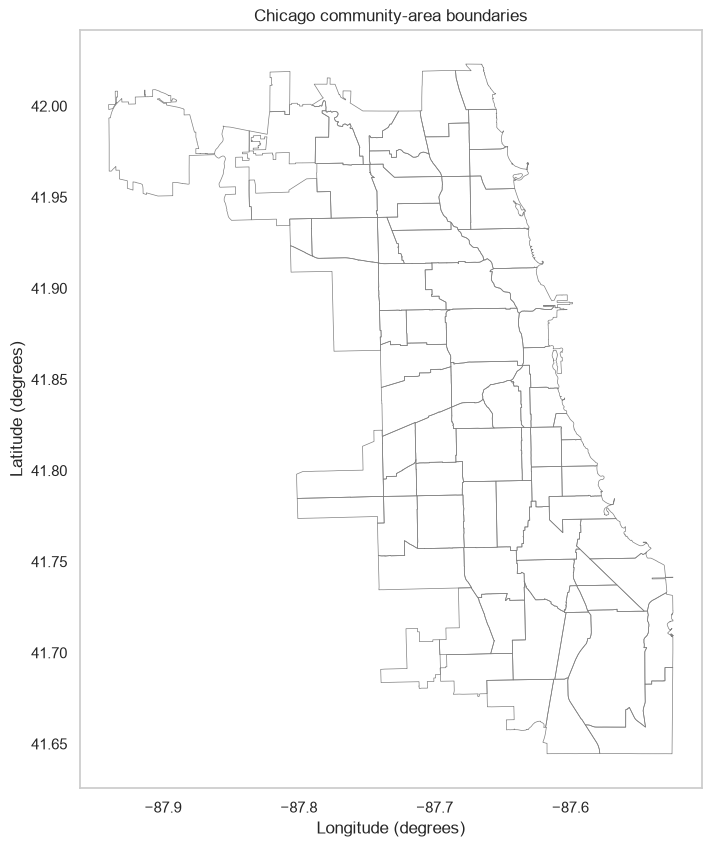
D.4 From Trip Rows to Station Locations
One trip row is not one station. Repeated trip origins describe use in this sample; a deduplicated station layer describes locations. We group by station ID and coordinates, retaining multiple locations if an ID moved. Missing coordinates are excluded, and counts below refer to trips with usable starting coordinates. Only observed starting stations are represented, not necessarily every station operating in 2013.
The station summary below uses .groupby(), which belongs to Data Grouping and Aggregation. If you have not met it yet, read it as “one row per station ID and coordinate pair, with the trips counted”.
trips = pd.read_csv(DATA / "divvy_2013.csv")
located_trips = trips.dropna(subset=["from_station_id", "longitude_start", "latitude_start"])
print(f"Excluded {len(trips) - len(located_trips):,} trips without a usable origin")
stations = located_trips.groupby(
    ["from_station_id", "longitude_start", "latitude_start"], as_index=False
).agg(station_name=("from_station_name", "first"), sample_trips=("trip_id", "size"))
station_points = gpd.GeoDataFrame(
    stations,
    geometry=gpd.points_from_xy(stations["longitude_start"], stations["latitude_start"]),
    crs="EPSG:4326",
)
# Transform the point layer to the boundary layer's CRS before overlaying.
station_layer = station_points.to_crs(chicago.crs)
print(f"{len(station_points):,} observed station locations from {len(located_trips):,} trips")
assert int(stations["sample_trips"].sum()) == len(located_trips)
Excluded 0 trips without a usable origin
107 observed station locations from 4,005 tripsfig, ax = plt.subplots(figsize=(7, 9), layout="constrained")
chicago.boundary.plot(ax=ax, color="gray", linewidth=0.5)
station_layer.plot(ax=ax, color="darkblue", markersize=8, alpha=0.7,
label="Observed starting station")
ax.set(title="Starting stations observed in the 2013 Divvy sample",
xlabel="Longitude (degrees)", ylabel="Latitude (degrees)")
ax.legend(loc="lower left")
ax.grid(False)
plt.show()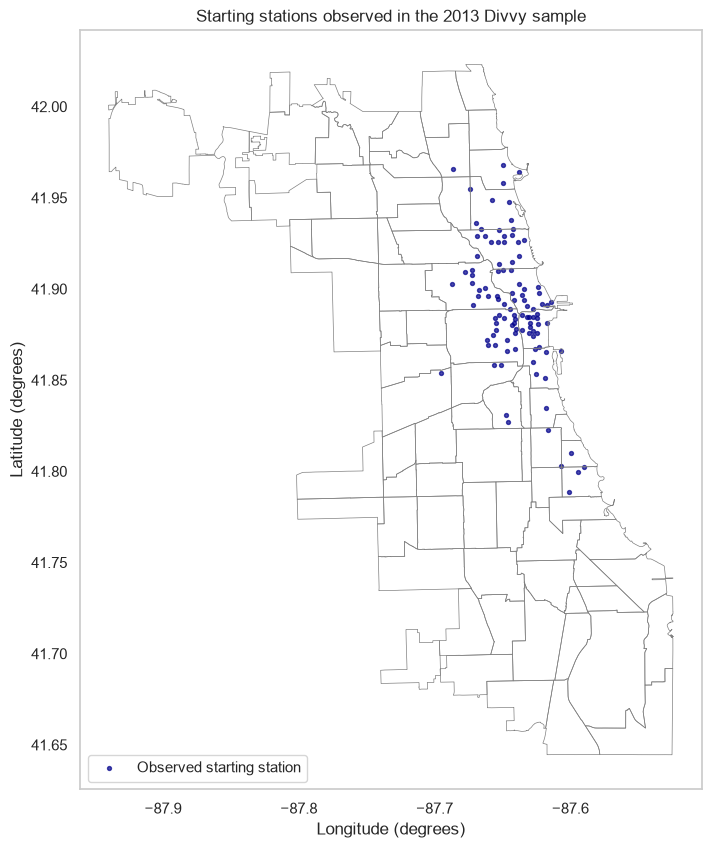
Interpret: Where are observed origins concentrated? What can this sample tell you about station locations, and what cannot it establish about access or total ridership? Explain why plotting every trip with identical markers answers a different question and creates overplotting.
D.5 Population Totals Versus Density
A choropleth shades regions by a statistic. Larger areas can contain more people simply because they cover more land. If the question concerns concentration, population density may be more useful than a total. Neither statistic answers every question.
The local population layer has 2000 and 2010 counts. Use a projected CRS with metre units to calculate square kilometres; do not calculate area directly from longitude/latitude degrees. EPSG:26916 (UTM zone 16N) is a regional projected system suitable for this Chicago teaching example. The denominator below is the area of the supplied polygon geometry; water-area treatment depends on the boundary source.
communities = gpd.read_file(DATA / "chicago_commpop.geojson")
communities_m = communities.to_crs("EPSG:26916")
communities["area_km2"] = communities_m.area / 1_000_000
communities["people_per_km2"] = communities["POP2010"] / communities["area_km2"]

fig, axes = plt.subplots(1, 2, figsize=(11, 7), layout="constrained")
for ax, column, label in zip(axes, ["POP2010", "people_per_km2"],
                              ["Population (2010)", "People per km² (2010)"]):
    communities.plot(column=column, cmap="Blues", legend=True, ax=ax,
                     legend_kwds={"label": label, "shrink": 0.6},
                     edgecolor="gray", linewidth=0.2)
    ax.set_title(label)
    ax.set_axis_off()
plt.show()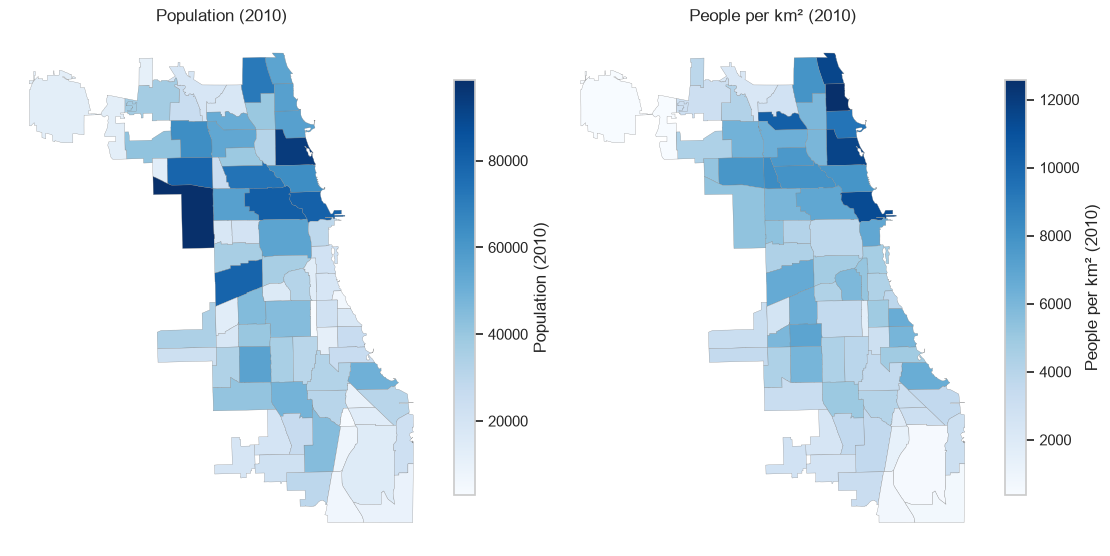
Read the two legends separately: the maps have different units. Use the same color limits when comparing the same statistic across years or groups. Sequential colors suit nonnegative population values; a diverging palette is appropriate for signed change around zero.
Classification methods such as quantiles or natural breaks group values into bins. They can change the visual story. Inspect the distribution and label class boundaries if you use them; ten classes are rarely a good starting point for a small map.
D.6 Interactive Maps with GeoPandas and Folium
GeoDataFrame.explore() returns a folium.Map. It supports tooltips and popups, and a second call can add a layer using m=m. A layer selector requires folium.LayerControl(); attribute search or filtering requires extra controls or data preparation.
The vector layers are local. Interactive maps still load browser JavaScript and, with default tiles, a web basemap. Keep the static plots above as a fallback when internet access or an HTML renderer is unavailable.
m = communities.to_crs("EPSG:4326").explore(
    column="people_per_km2", cmap="Blues", legend=True,
    tooltip=["community", "POP2010", "people_per_km2"],
    tooltip_kwds={"aliases": ["Community", "Population (2010)", "People per km²"], "localize": True},
    name="Population density (2010)",
)
station_points.explore(
    m=m, color="darkred", name="Observed origins (2013 sample)",
    tooltip=["station_name", "sample_trips"],
    tooltip_kwds={"aliases": ["Starting station", "Trips in sample"]},
    marker_kwds={"radius": 3, "fill": True},
)
folium.LayerControl(collapsed=False).add_to(m)
m
Make this Notebook Trusted to load map: File -> Trust Notebook
Hover over a community or station, zoom in, and toggle the layers. Population counts refer to 2010, while the trips refer to a 2013 sample. Their overlay supplies geographic context; it does not establish a contemporaneous population-ridership relationship.
Export an interactive map to an HTML file for a project:
m.save("chicago-divvy-map.html")Share the HTML file as well as a static figure when appropriate. Test the exported file in a browser; a screenshot cannot preserve hovering, zooming, or layer controls. Basemap attribution must remain visible.
D.7 Choose a Map for a Project Question
- Where are locations? Plot one point per location over neutral boundaries.
- How much activity occurs at locations? Aggregate events and clearly explain the size or color encoding and observation period.
- How do regions compare? Choose a count, rate, or density deliberately; state its denominator and year.
A visually prominent region is not automatically the region with the greatest need, best access, or highest risk. Those claims require additional measurements and an appropriate comparison population.
D.8 Summary Cheat Sheet
| Task | Code |
|---|---|
| Reading | |
| Read a shapefile or GeoJSON | gpd.read_file(path) |
| See the layer’s coordinate system | layer.crs |
| See its extent | layer.total_bounds |
| Coordinates | |
| Declare a known CRS (no values change) | layer.set_crs("EPSG:4326") |
| Transform coordinates to another CRS | layer.to_crs("EPSG:26916") |
| Build points from longitude/latitude columns | gpd.points_from_xy(df["lon"], df["lat"]) |
| Make a point layer | gpd.GeoDataFrame(df, geometry=..., crs="EPSG:4326") |
| Align a layer with another before overlaying | points.to_crs(boundaries.crs) |
| Static maps | |
| Draw a layer into a panel | layer.plot(ax=ax, ...) |
| Neutral boundaries under a point layer | layer.plot(ax=ax, facecolor="none", edgecolor="grey") |
| Shade regions by a statistic | layer.plot(column="value", legend=True, ax=ax) |
| Area in square kilometres | project to metres first, then layer.area / 1e6 |
| Interactive maps | |
| An interactive map from a layer | layer.to_crs("EPSG:4326").explore(...) |
| Add a second layer to it | other.explore(m=m, ...) |
| Layer selector | folium.LayerControl().add_to(m) |
| Save for sharing | m.save("map.html") |
D.9 Before You Move On
The discipline that separates a map from a picture of a map is the coordinate reference system. Establish each layer’s CRS from its metadata, transform with to_crs() when layers must be drawn together, and never set_crs() a layer just to silence a mismatch — that declares a lie about what the numbers mean and puts your points in the wrong place without an error.
Before a map goes into a project, check that:
- Every layer’s CRS is known and they agree, and any area or distance was computed in a projected CRS with metre units.
- The statistic you shaded regions by is a deliberate choice among count, rate, and density, with its denominator and year stated.
- Excluded rows are reported — how many locations were dropped for missing coordinates, and what that does to the claim.
- The observation period of each layer is stated, and layers from different years are not implied to be contemporaneous.
- An interactive map has a static fallback, and its basemap attribution is visible.
A visually prominent region is not automatically the region with the greatest need, best access, or highest risk. Those claims need additional measurements and an appropriate comparison population.
References: GeoPandas coordinate reference systems, GeoPandas interactive maps, GeoDataFrame.explore, GeoPandas mapping and plotting tools, Folium, and EPSG.io for looking up a coordinate reference system by code.